Text message consent
VetAgent is operated by Govan Systems Inc. Veterinary clinics use it to send appointment reminders, prescription refill updates and vaccination reminders to their own existing clients. This page exists so that anyone — including carriers and messaging reviewers — can see exactly how consent is obtained and what wording is shown, without needing an account.
Two ways to opt in, both on a web form or by keyword — never on paper
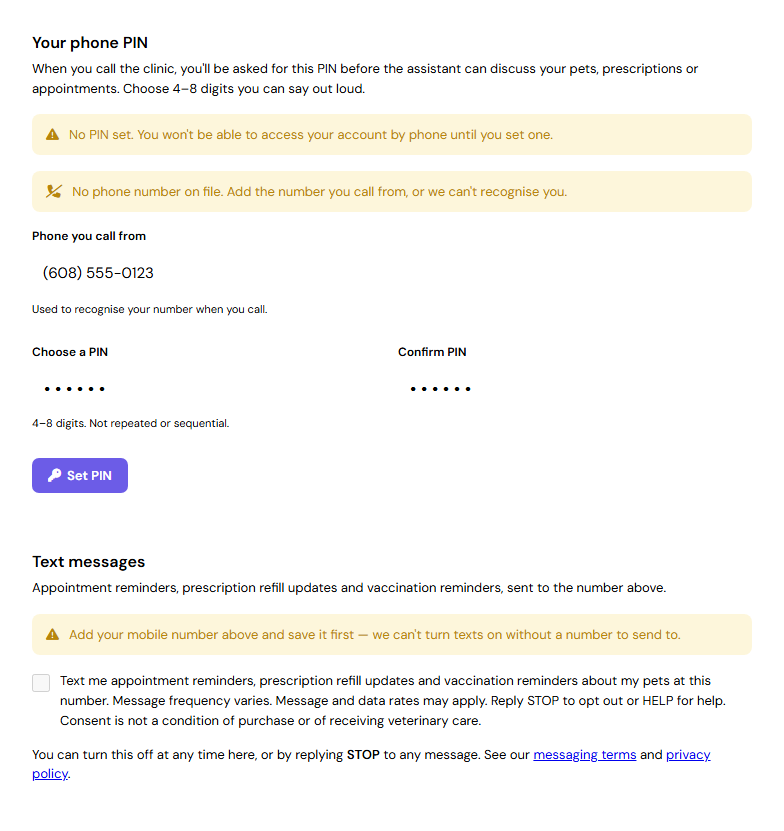
1. Web form (primary). A pet owner signs in to their own account on their clinic's VetAgent portal at bella.govansys.com, opens Settings → Phone PIN, enters their mobile number, and ticks a checkbox. The checkbox is unchecked by default. Nothing is sent to anyone who has not ticked it.
2. Keyword. An owner who has previously replied STOP can resubscribe by texting START (or YES or UNSTOP) to their clinic's number. A number is never subscribed this way unless it is already on an existing client account; a keyword from an unrecognised number is answered and nothing is recorded.
What the owner sees
The opt-in form itself is inside the owner's password-protected account, so the whole form is reproduced below exactly as it appears there — the mobile number field the owner fills in, and the consent checkbox directly beneath it — followed by a screenshot of the live signed-in screen.
The phone number is collected as part of the opt-in itself. The checkbox cannot be ticked until a mobile number has been entered and saved: until then it is disabled and the form says so. The server enforces the same rule and rejects any consent submitted without a number on file, so a consent record can never exist without naming the number it was given for.
Phone number
Text messages
What is recorded
Each time consent is given or withdrawn, VetAgent stores:
- the date and time
- the specific mobile number the consent applies to
- the exact disclosure text shown at that moment, so a later change of wording cannot be mistaken for what the person actually agreed to
- the originating IP address
- whether it was a grant or a withdrawal
Withdrawals are added to that history rather than replacing the original record, so the full sequence remains auditable. Consent is never inferred from possession of a phone number: existing accounts holding a number were not opted in, and every owner opts in explicitly.
Message types and frequency
- Appointment reminders and confirmations
- Prescription refill status updates
- Vaccination and preventive-care reminders
Frequency varies with each pet's appointment and prescription activity; there is no fixed schedule or recurring campaign. Messages are transactional and relate to care the owner's own clinic is providing. We do not send marketing or promotional messages.
Opting out and getting help
Reply STOP to any message to stop immediately — one confirmation follows, then nothing further. Reply START to resume, or HELP for assistance. Owners can also turn messages off from the same screen where they turned them on. Message and data rates may apply. Carriers are not liable for delayed or undelivered messages.
Your mobile information
No mobile information will be sold or shared with third parties or affiliates for marketing or promotional purposes. Mobile opt-in data and consent are never shared with any third party. Phone numbers are disclosed only to the messaging carrier and to our messaging provider for the sole purpose of delivering the messages the owner asked to receive. Full detail is in our Privacy Policy and messaging terms.
Not for emergencies
Text messaging is not a channel for veterinary emergencies. In an emergency, telephone your clinic or an emergency veterinary hospital directly.
Contact
Govan Systems Inc
Email: support@govansys.com